

Creating content for a product launch can feel overwhelming, especially when you鈥檙e not sure what great launch content looks like.聽
You want to equip your Sales team with resources they鈥檒l actually use. You want leadership to feel confident that everything is covered. And more than anything, you want the launch to feel seamless, not scrambled.
But without clear guidance, it鈥檚 easy to miss something important or spend time on assets that go unused.
This article can help you. Here, you鈥檒l find:
- Examples of content to create for Sales, Customer Success, customers, and executives.聽
- A checklist to make sure nothing slips through the cracks
- Practical tips to ensure Sales and Customer Success reps can easily find and use the content
What is product launch content?
Product launch content are materials that help teams speak confidently about a new product (or feature) and allows customers to understand its value right away.聽
While a launch strategy outlines the what and when of a release, launch content generates awareness, creates excitement, and drives initial sales among prospects.聽聽
There are two types of launch content:聽
- Internal content helps Sales, Customer Success (CS), and other internal teams understand what鈥檚 launching, why it matters, and how to talk about it. Think enablement decks, messaging docs, and internal FAQs.聽
- External content helps customers and prospects understand the product鈥檚 value and how to use it. Think launch emails, in-app messages, blog posts, and product demos.聽
Launch content happens in three stages:聽
- Pre-launch content prepares internal teams and aligns stakeholders before the launch, e.g., messaging briefs, sales decks, and early-access FAQs.聽
- Launch content increases product visibility and activation during launch week, e.g., announcements, product one-pagers, demo videos, and in-app messages.聽
- Post-launch content reinforces the product鈥檚 value after the launch, e.g., follow-up campaigns, customer case studies, and in-app tooltips.
Who is responsible for product launch content?聽
Product Marketing typically leads the charge. They鈥檙e the team closest to the product and its positioning, so Product Marketing Managers (PMMs) are best equipped to translate updates into clear, compelling messaging.聽
They also work with the Sales, Customer Success, and Marketing teams to tailor content for each audience.
However, if you don鈥檛 have a dedicated Product team, the responsibility falls to whoever鈥檚 closest to the product and the customer. That could be a Content Marketer, Lifecycle Marketer, or even a Founder.聽
In smaller teams, it鈥檚 common for a Content Marketer to write the copy while other marketers handle design and/or distribution. What matters is that someone owns the messaging and that all teams are aligned on how to use it.
Read: The AI-powered product marketing playbook for the Just-in-Time Era
Why is product launch content so important to the success of a launch?
Here are a few reasons why launch content is foundational to launch success:
(1) It equips sales and customer success teams to deliver the message with confidence.
Sales and support teams are customer-facing, so they need clear talking points, ways to handle objections, and messaging that adapts to different audiences. Launch content provides that information, which makes it easier to communicate value and guide prospects toward adoption.
(2) It keeps messaging consistent across every team and channel.
Without shared materials, reps may create their own explanations of what the product does. That leads to misalignment, mixed messages, and a disjointed customer experience. Centralized content keeps everyone on the same page.
(3) It reinforces the value proposition behind the launch.
Good content not only explains what鈥檚 new, but also ties it back to real customer pain points. When every team frames the product the same way, the message hits harder, which speeds up buying decisions, boosts conversions, and ultimately drives revenue.
3 product launch content examples for your sales team
Sales reps are often the first point of contact for a new product or feature, so they need content that helps them confidently explain what鈥檚 new, handle objections, and connect the product to real customer needs.聽
Here are three launch content examples that do exactly that:
1. Product launch battlecard by Pipe17
A battlecard is a concise, skimmable sales aid that gives reps the core messaging they need to position a product confidently during a real-life conversation.聽
For example, was designed to help Pipe17鈥檚 partner, Acumatica, explain what Pipe17 is, who it鈥檚 for, and the operational challenges it solves.
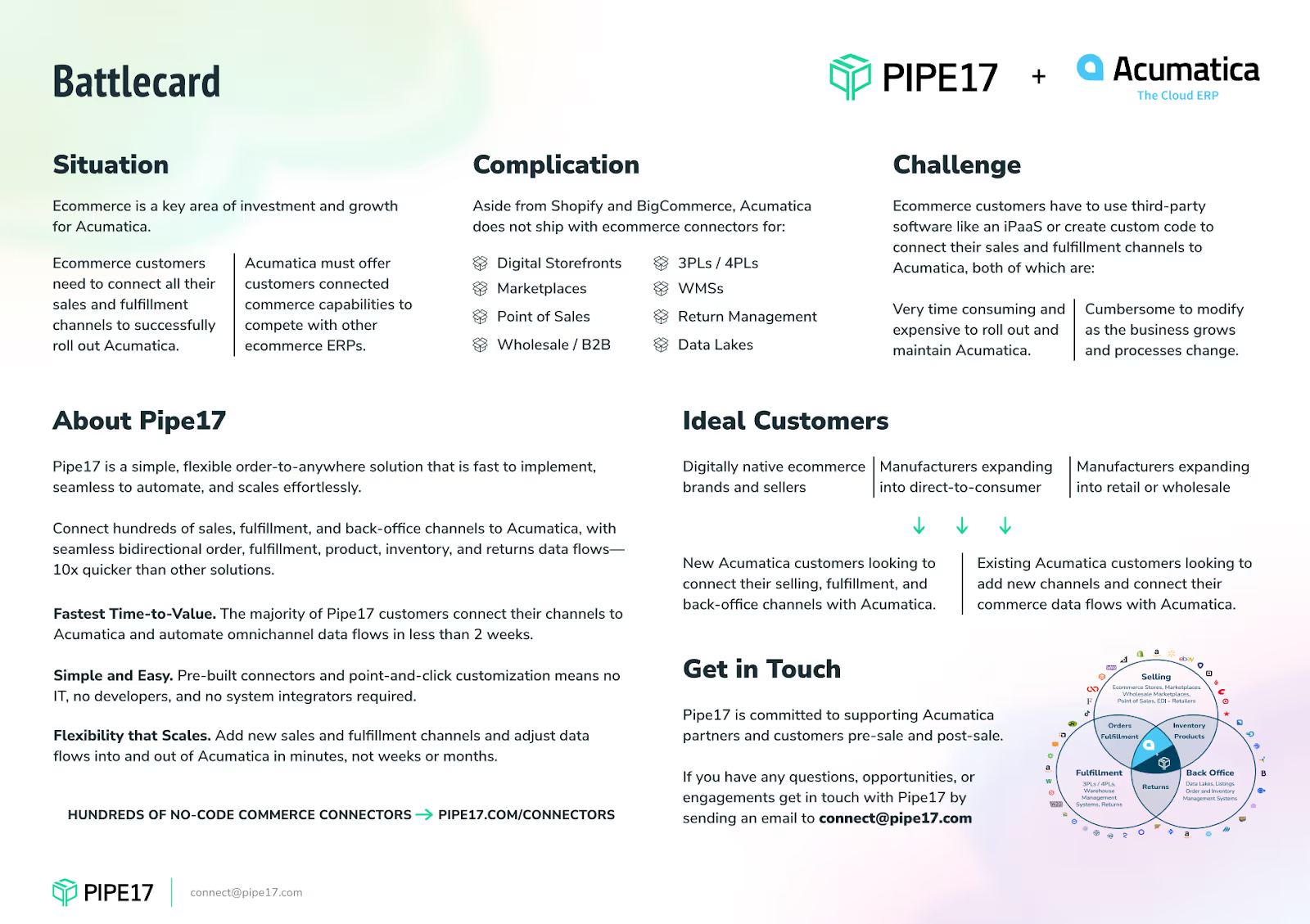
This battlecard stands out because:
- It leads with pain points. Operational challenges like high expenses and difficulty scaling with Acumatica alone take center stage, helping sellers connect value to real business problems.
- It鈥檚 designed for non-technical partners. The messaging avoids technical jargon and focuses on how Pipe17 helps customers, rather than its backend logistics.聽
- It offers a clear customer fit snapshot. It outlines ideal customers and common platform integrations (Shopify, BigCommerce) so partners know whom to target.
When to deliver: Pre-launch, so reps have time to absorb the messaging before customer conversations start.
Tips for creating your own battlecard:
- Skip internal jargon and focus on how the product helps solve real problems.
- Prioritize readability with bold section headers, bullet points, simple language, and white space.
- Clearly outline what sets the product apart from competitors.
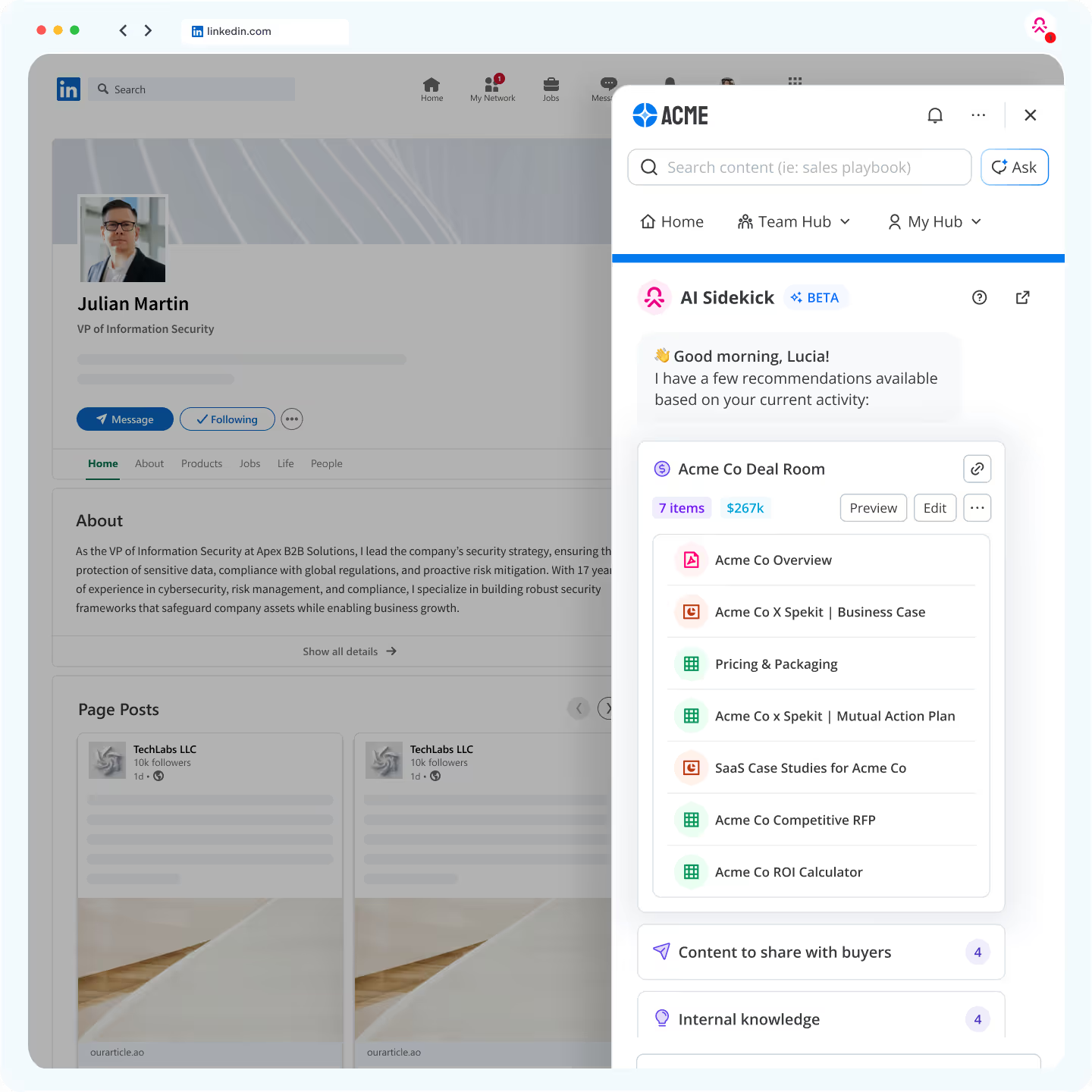
Once created, 黑料吃瓜网 surfaces those battlecards right inside the tools reps already use, like Salesforce or Outreach.
2. Product launch sales deck by Folk
A sales deck is a structured visual presentation that helps sales reps walk prospects through the product鈥檚 value, features, and use cases. For example, helps the team at Folk pitch its collaborative CRM to modern teams who feel boxed in by traditional CRMs.聽
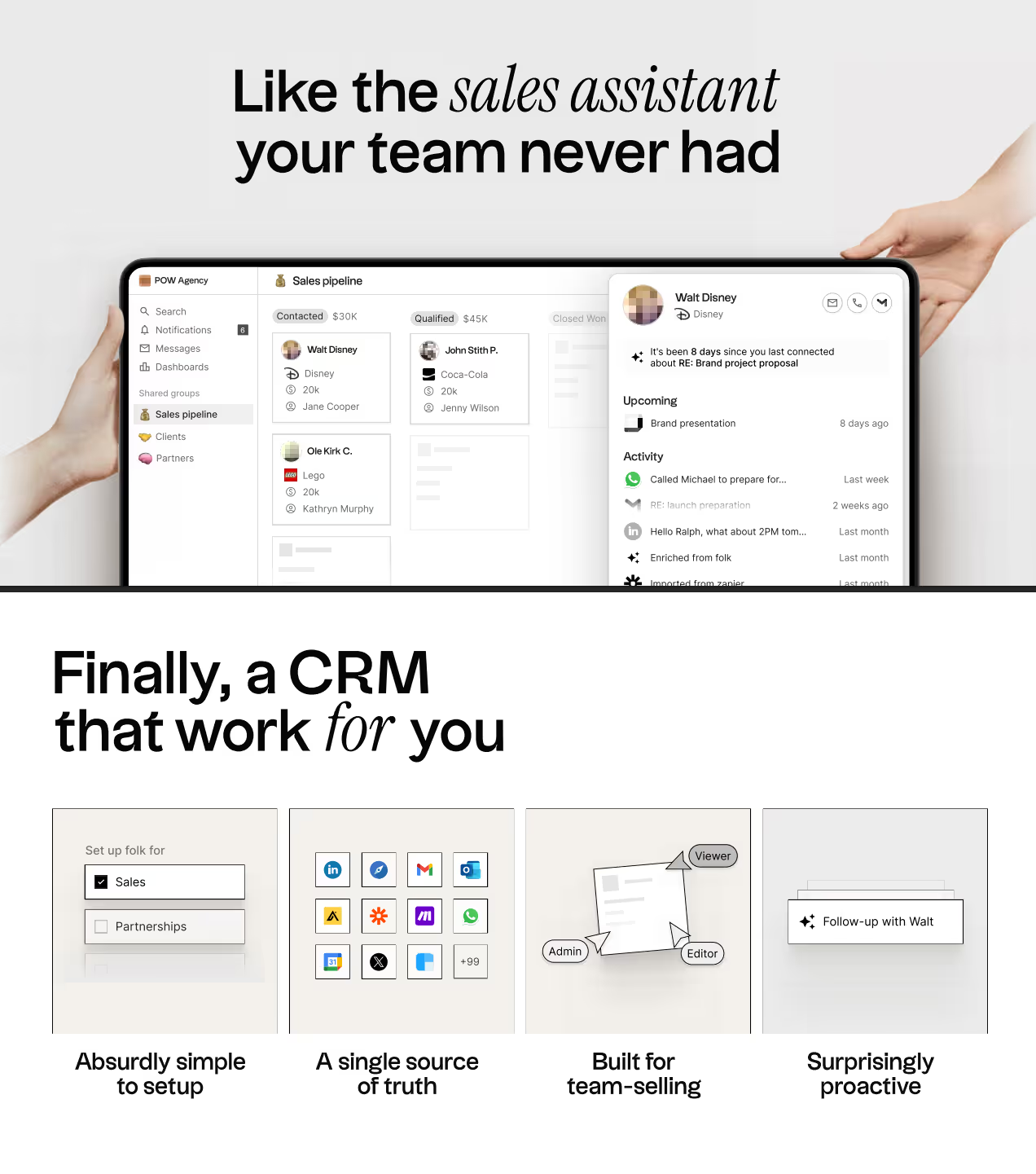
This sales deck stands out because:
- It starts with the tool鈥檚 value proposition. The opening immediately frames Folk as 鈥榓bsurdly simple to set up,鈥� 鈥榓 single source of truth,鈥� 鈥榖uilt for team-selling,鈥� and 鈥榮urprisingly proactive,鈥� which is everything the target audience wants.
- It highlights contrast without going negative. Rather than tearing down competitors, it focuses on Folk鈥檚 flexibility, simplicity, and speed, framing it as a smarter fit for fast-moving teams.
- Reassures customers. Folk helps businesses manage sensitive customer data, so the deck reassures prospects with key security credentials like GDPR, SOC 2, and Google Secure compliance.
When to deliver: During launch week, as part of internal sales enablement and external outreach.
Tips for creating your own sales deck:
- Use colors, fonts, and layouts that reflect your brand and product experience.聽
- Show how your product fits into a real workflow, solves a relatable problem, and creates tangible outcomes.聽
- End your deck with a clear next step, whether it鈥檚 downloading an app or starting a trial. Explain how to do this, so there鈥檚 no room for confusion.聽
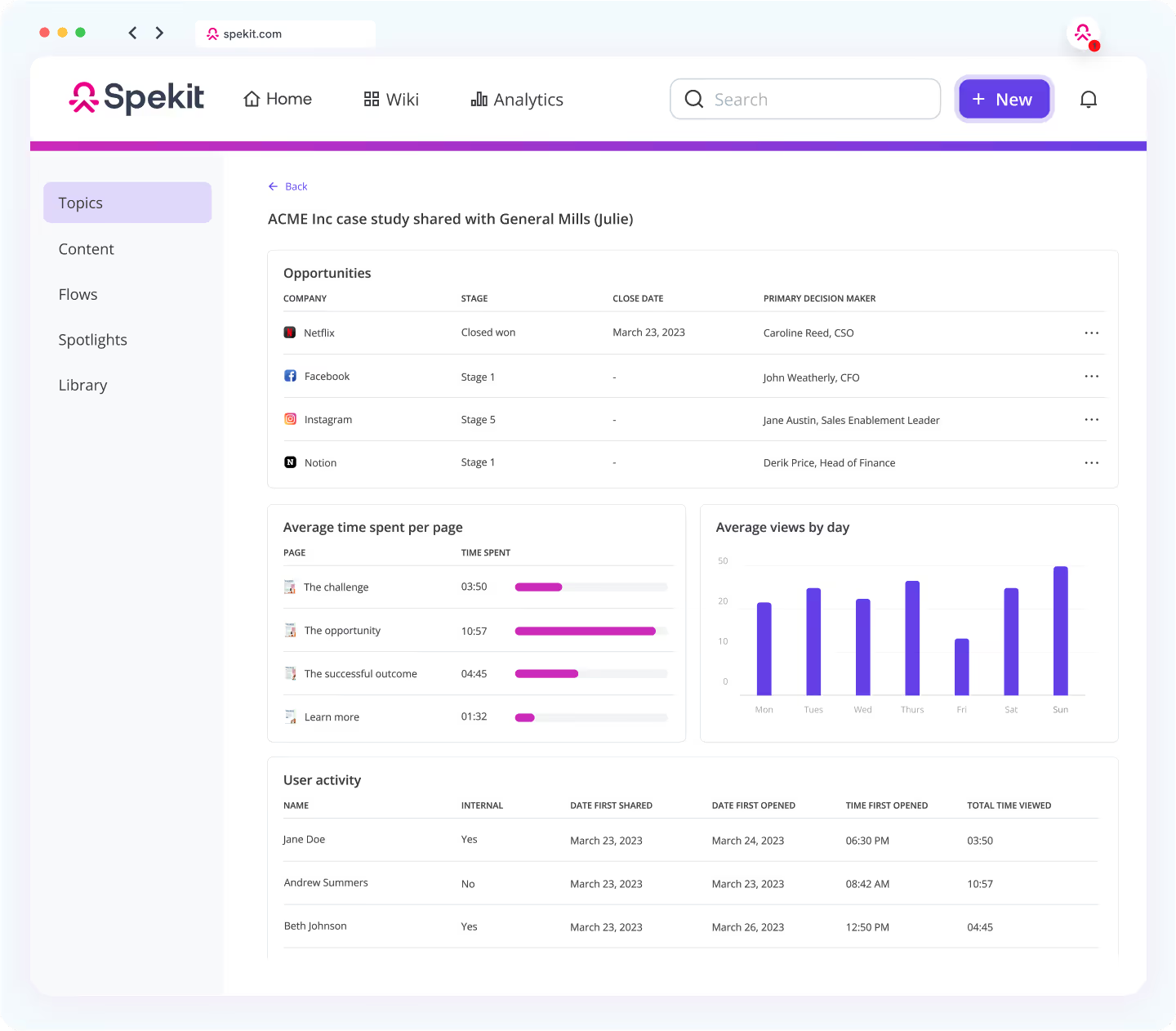
馃挕黑料吃瓜网 tip: Upload your sales deck to 黑料吃瓜网 and share it with your team using SmartSend, so you can track who鈥檚 sharing it and how it鈥檚 being used.
3. Product launch talk tracks
A talk track is a short, conversational guide reps use during sales or discovery calls to explain a product or feature clearly and consistently. It鈥檚 similar to a journalist鈥檚 script: there鈥檚 a clear narrative to follow, key points to hit, and a message to land.聽
But unlike a rigid script, a good talk track gives reps room to adapt, allowing them to tailor their delivery to the prospect, pivot based on questions, and keep the conversation natural.
贬别谤别鈥檚 an example of a talk track for launching a new integration feature:
Prompt: 鈥淒oes your team use [tool] today?鈥�
Response: 鈥淧erfect. We just launched an integration with [tool] that connects your workflows directly. No need for manual exporting or switching between tabs. It鈥檚 been a big win for teams managing multiple systems or trying to centralize updates.鈥�
Follow-up CTA: 鈥淗appy to show you how it works or send a short walkthrough after this call.鈥�
This talk track is effective because:
- It starts with a question and engages the prospect instead of launching straight into a pitch.
- It leads with benefits and focuses on solving a workflow problem.
- It closes with a clear, low-friction CTA.
When to deliver: Pre-launch, so reps can practice and integrate them into their conversations ahead of time.
Tips for creating your own talk tracks:
- Keep them short and flexible. Talk tracks should guide the conversation, not control it.聽
- Start with the problem, then explain how your product helps in layman's language.
- Create different tracks for outbound intros, demo transitions, or objection handling so reps can pull the right one at the right time.
馃挕黑料吃瓜网 tip: With 黑料吃瓜网, you can embed talk tracks as tooltips or 鈥楽peks鈥� directly into the apps reps use, like Salesforce or Gmail. When a rep clicks into a field or pipeline stage, the right messaging appears automatically.
Read: 8 Best Sales Enablement Software, Tools, & Platforms
3 product launch content examples customer success reps need
Customer Success reps play a key role in driving adoption post-launch. Here are three content types that help them support users effectively:
1. Product launch help docs by HubSpot
When a new product or feature launches, Customer Success reps need updated help docs that explain what it is and how it works, so they can confidently support customers.聽
An example is , which is consistently updated with every new feature, product, or acquisition.聽
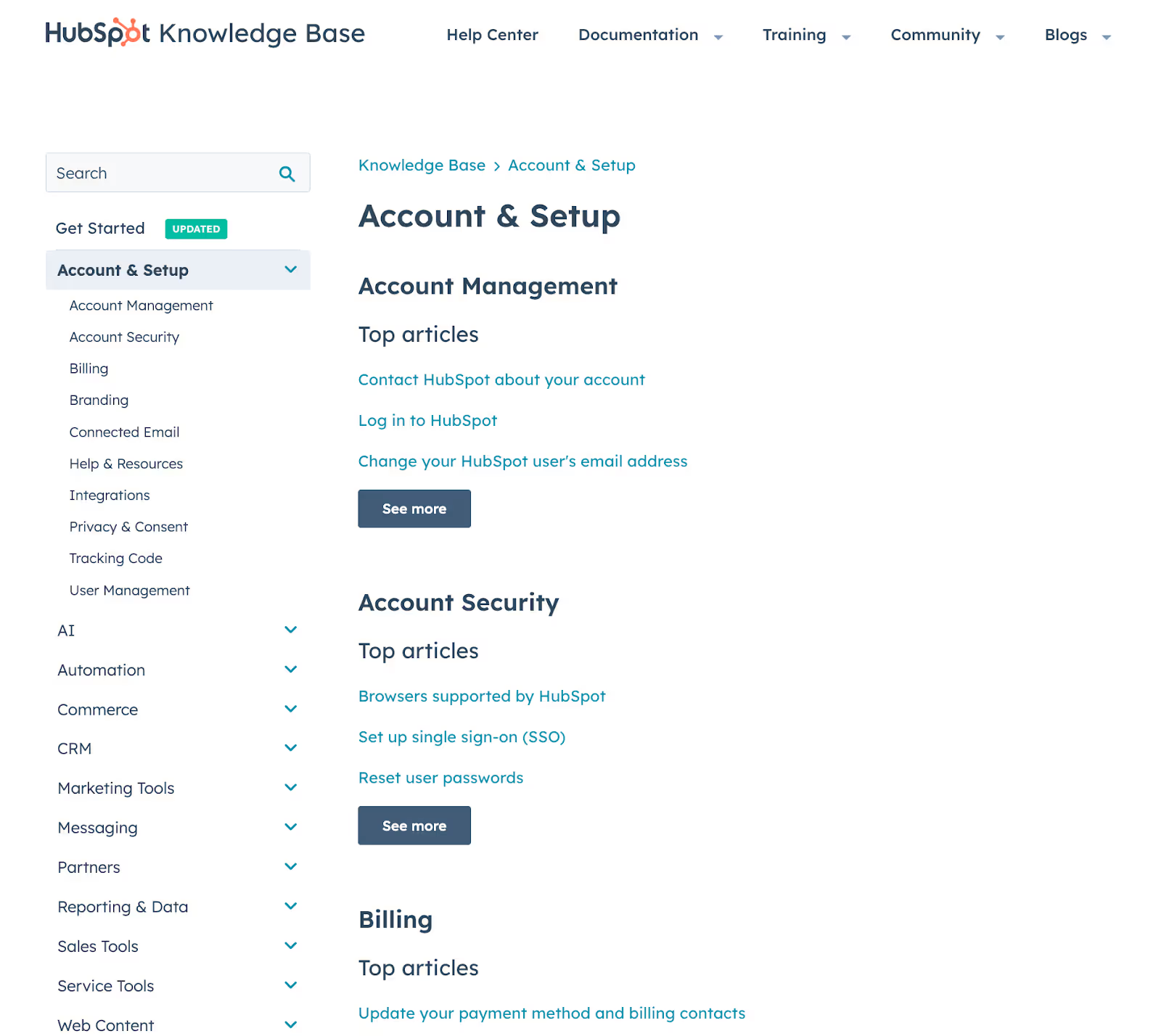
Why HubSpot鈥檚 help center stands out:
- It goes beyond articles. Users can browse guides, ask the HubSpot Community, enroll in short courses from HubSpot Academy, or connect with a certified partner, all from one place.
- It鈥檚 comprehensive. The searchable knowledge base spans dozens of tools and use cases, from AI and content to CRM setup and billing.
When to deliver: Launch week, so reps can direct early users to it when needed.
Tips for building your own help docs:
- Use plain language and step-by-step instructions. Avoid assumptions about what users already know.
- Visuals, like screenshots or short videos, make it easier for customers to follow instructions, especially for complex workflows.
- Link your help docs to related resources, like product tours, community threads, or onboarding content, to provide better support.
馃挕黑料吃瓜网 tip: 黑料吃瓜网 lets you turn help content into embedded Speks so customer reps can access it in the apps they鈥檙e working in. You can also update Speks when features change, which keeps documentation fresh without re-uploading PDFs or chasing down old links.
2. Product launch onboarding updates by Slack聽
When you launch something new, update your onboarding materials (walkthroughs, videos, and emails) so users hit the ground running, instead of getting stuck in outdated flows.
贬别谤别鈥檚 , which helps organizations set up Slack correctly.
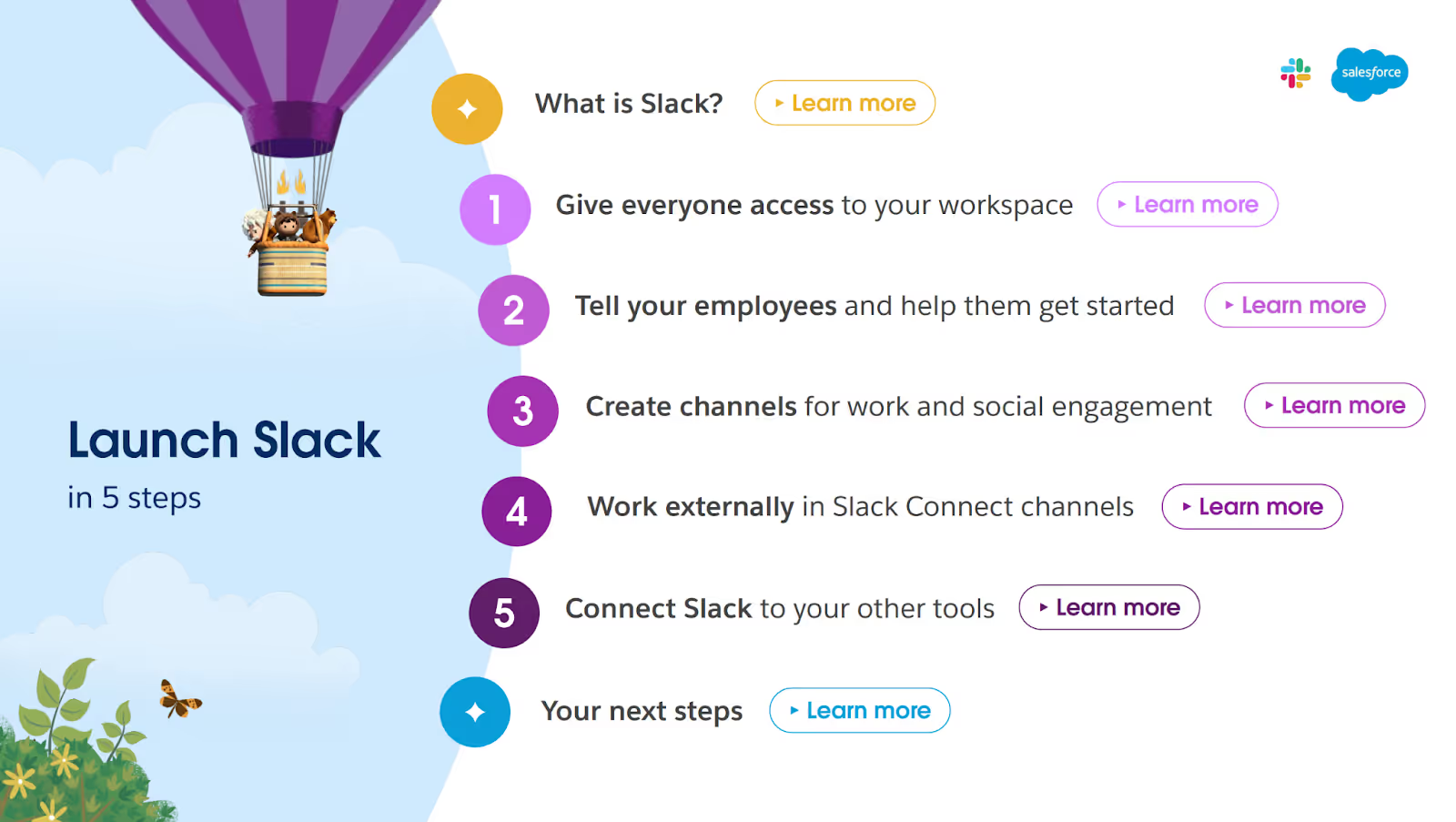
Why this onboarding document stands out:
- Clear step-by-step process: It breaks onboarding into five simple stages, making it easy to follow.
- Actionable quick links: The document includes 鈥楽how me how鈥� and 鈥楲earn more鈥� prompts that link directly to tutorials and relevant resources.
- Role-specific guidance: It offers different tips for admins, team leads, and regular users, so instructions stay relevant to whoever is reading.
When to deliver: During launch week.
Tips for creating effective onboarding updates:
- Don鈥檛 make users rewatch or reread everything. Flag what鈥檚 new and why it matters.
- Each section should have a clear action users can take to move forward, whether it鈥檚 setting something up or watching a quick demo.
- Test the onboarding flow like a first-time user to catch confusing steps, broken links, or parts that need more context.聽
- Product launch in-app FAQs by 黑料吃瓜网
Any time you launch something new, users are going to have questions:聽
- What does it do?聽
- How does it work with what they鈥檙e already using?聽
- How much does it cost?聽
黑料吃瓜网鈥檚 Chrome extension gives reps access to FAQ answers through an in-app tab, which opens within the platforms reps already use, so they don鈥檛 have to switch tools.
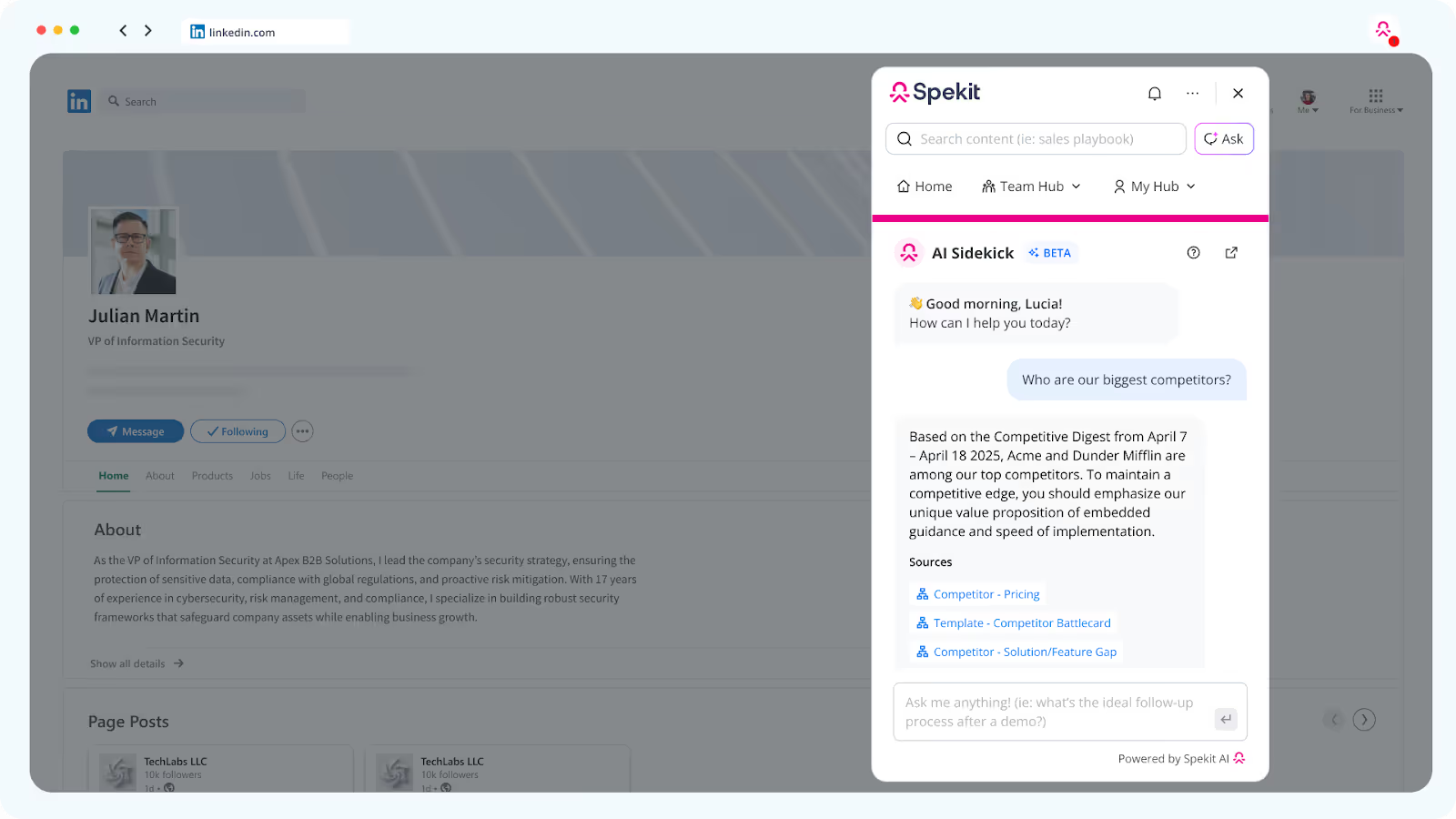
Why this approach works:
- It keeps reps in flow. No need to stop what they鈥檙e doing or switch platforms just to find an answer.
- It reduces response time. Reps can answer confidently and quickly, improving customer satisfaction.
- It ensures consistent messaging. Everyone pulls from the same up-to-date source, so answers stay accurate across the team.
When to deliver: In-app FAQs should go live during launch week and stay updated as new questions arise post-launch.
Tips for creating your own in-app FAQs:
- Instead of guessing what users might ask, use past tickets or beta feedback to build your FAQ list.
- Keep answers short, so CS reps can read and repeat them easily.
- Organize FAQs by feature, user role, or workflow to make browsing easier in the moment.
3 product launch content examples the Exec team needs
Executives think about strategic alignment, business impact, and what success looks like at a higher level. So, the content they need should provide a strong understanding of what the launch is aiming to achieve and how.聽
Here are three product launch content examples the exec team needs:聽
1. Product go-to-market (GTM) plan
A go-to-market (GTM) plan outlines how a company will launch a product or feature, from the target audience and messaging to channels and success metrics.聽
It shows executives how the launch connects to broader business goals, which teams are responsible for what, and where potential risks lie. It also helps them communicate the launch strategy to internal and external stakeholders.聽
While full GTM plans are rarely public, you can infer a company鈥檚 strategy by how they launch. Loom, for example, capitalized on the demand for asynchronous communication during the COVID-19 pandemic.聽
Loom鈥檚 GTM approach stood out because:
- It used a freemium model to lower the barrier to entry and let users try the product before buying.
- It allowed recipients of Loom videos to experience the product before signing up themselves.
- The smart in-app prompts encouraged team invites and timely upgrades without interrupting the user flow.聽
When to deliver: A few weeks before the launch to create time space for feedback, resourcing decisions, and alignment).
Tips for creating a GTM plan:
- Build your plan around a real pain point or opportunity in the market.
- Explain how the product will reach users and which levers (sales, self-serve, partners) will be activated.
- Set clear, measurable goals (e.g., adoption, activation, revenue contribution) so everyone understands what you鈥檙e aiming for.聽
2. Product launch metrics dashboard by Geckoboard聽
A launch metrics dashboard gives execs a real-time view of post-launch performance by tracking product adoption, engagement, and revenue.聽
A great example is Geckoboard鈥檚 , built on the AARRR framework (Acquisition, Activation, Retention, Referral, Revenue).

Why this dashboard stands out:
- It focuses on outcomes. Instead of vanity metrics, it shows whether users are sticking around, referring others, and generating revenue.
- It鈥檚 easy to scan. The visual layout is digestible at a glance, which is ideal for busy execs who want quick insight without digging.
- It tracks the full customer journey. From first touch to revenue, the AARRR framework gives execs visibility into how users move through the funnel.
When to deliver: A few days before the public launch, so execs and stakeholders can start tracking early signals from day one.
Tips for building your own launch dashboard:
- You鈥檙e not limited to AARRR. Include any relevant metrics (like churn reduction, NPS changes, or CSAT) based on your launch goals.聽
- Keep the design clean and the metrics scannable.
- Include baselines or benchmarks to give context to the data and show progress.
- Product messaging framework document聽
A messaging framework is a structured guide for how to talk about a product: what it is, who it鈥檚 for, and why it matters. It outlines your value proposition, key messages by audience, and proof points to support your claims.
This document helps execs speak clearly to investors, enterprise buyers, and internal teams about the product without missing key points.
When to deliver: Before launch (during GTM planning), so leadership and cross-functional teams are aligned from day one.
Tips for creating your own messaging framework:
- Start with the pain point your audience cares about, then explain how your product solves it.
- Different stakeholders care about different things, so customize the messaging to resonate with each group.
- Prioritize clarity and make key points easy to repeat.
3 product launch content examples your customers need
During a product launch, customers need content that helps them understand what鈥檚 new, why they need it, and how it fits into their workflow. Here are some types of launch content you can create:聽
1. Product demo video by Intercom聽
A product demo video is a short walkthrough that shows your product or feature in action. It鈥檚 one of the fastest ways to communicate value, especially for visual learners or busy decision-makers.
贬别谤别鈥檚 a demo video from , showcasing how its AI-powered platform helps customers get faster support, agents work more efficiently, and team leaders gain better insights.
Why this demo video stands out:
- Speaks to different audiences: It shows how the platform benefits customers, agents, and managers, so everyone sees what鈥檚 in it for them.
- Shows real use cases: Tasks like automating ticket routing or summarizing conversations make the demo feel practical and relevant.
- Backed by impact: Stats like 鈥�86% of conversations handled by Fin鈥� make the value measurable and credible.
When to deliver: Launch week鈥攅mbed it in product pages and launch emails.
Tips for creating a product demo video:
- Use clear examples that reflect your customers鈥� workflows, so they can see how the product fits into their day.
- Guide the audience on what to do next (e.g., request a demo, sign up for a trial).聽
- Make the demo accessible with captions, transcripts, UI animations, and visual cues.
2. Customer case study by 黑料吃瓜网聽
Once customers start using your products and seeing results, capture their experience in a case study. Case studies are real-world proof that your product works.聽
贬别谤别鈥檚 our case study on InMoment, which shows how 黑料吃瓜网 helps the company reduce the time reps spend searching for content by 90%.聽
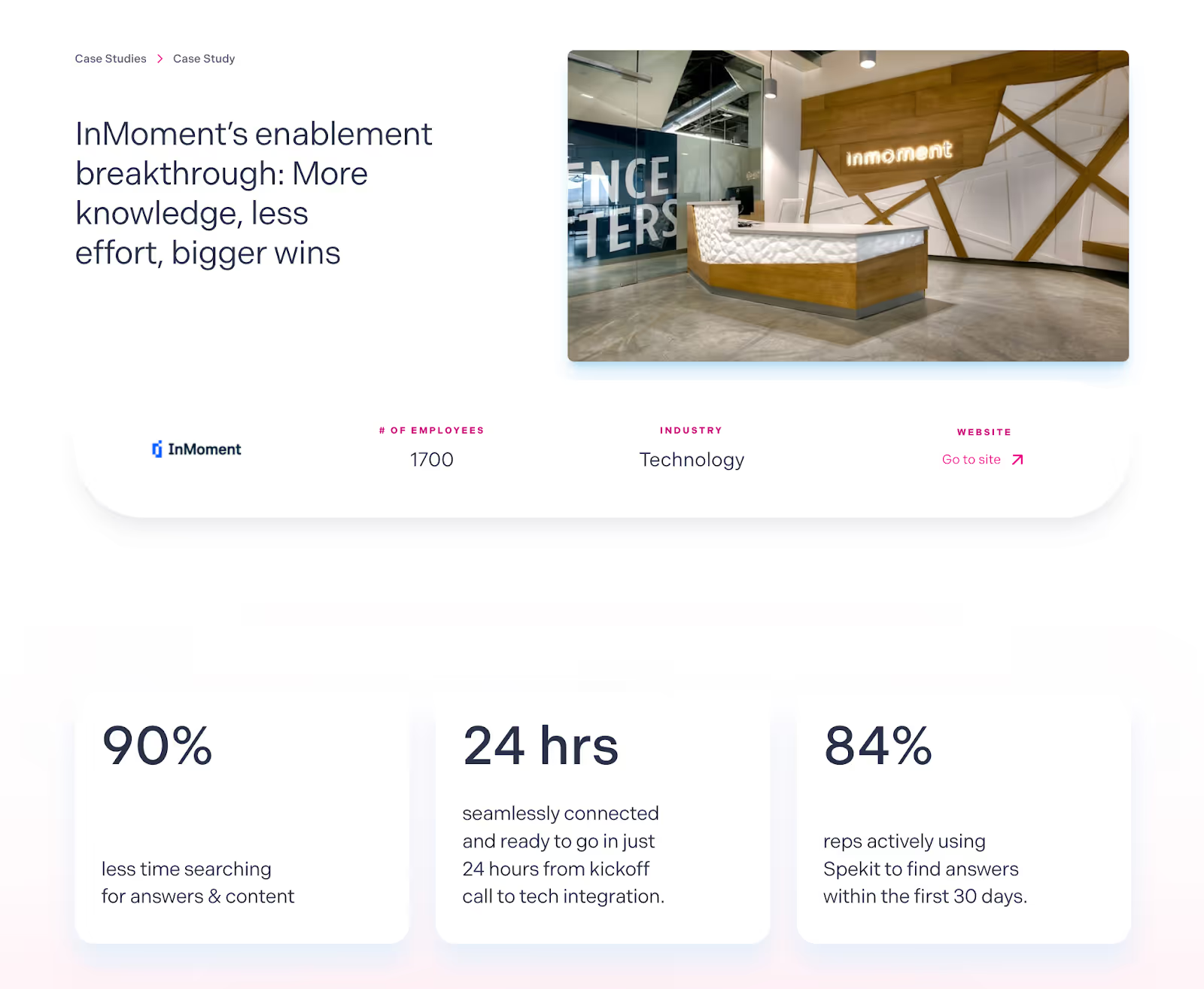
Why this case study stands out:
- Clear problem-solution structure: It discusses the challenge (InMoment鈥檚 fragmented approach to content management) and shows how 黑料吃瓜网 solved it with a combination of just-in-time enablement and an intuitive content management system (CMS).聽
- Credible voice of the customer: Quotes from InMoment鈥檚 Senior Director of Revenue Enablement lend authority and help the story feel real.
- Clear execution details: It shows how InMoment implemented 黑料吃瓜网 into their workflow(s)聽 in under 24 hours, and the impact they saw in just the first 30 days.
When to deliver: Post-launch, once results are available, but you can prepare them earlier if you鈥檝e done beta testing or pre-release pilots.
Tips for creating a compelling case study:
- Start with a specific challenge (鈥渁 fragmented approach to content management鈥�) and connect it to a measurable outcome (鈥減owerful CMS and just-in-time enablement increased activation by 73%鈥�).
- Use real quotes and job titles. Let your customers鈥� words bring credibility and relatability to the story.
- Explain how the customer used your product, so prospects can visualize applying it in their own context.
- ROI calculator by GoodTime聽
If your product directly impacts time, cost, or efficiency, an ROI calculator can be a powerful way to show value upfront. Calculators help customers see exactly what your product could save or earn them, before they talk to Sales.
A great example is , which estimates time and cost savings for companies using GoodTime Hire for interview scheduling.
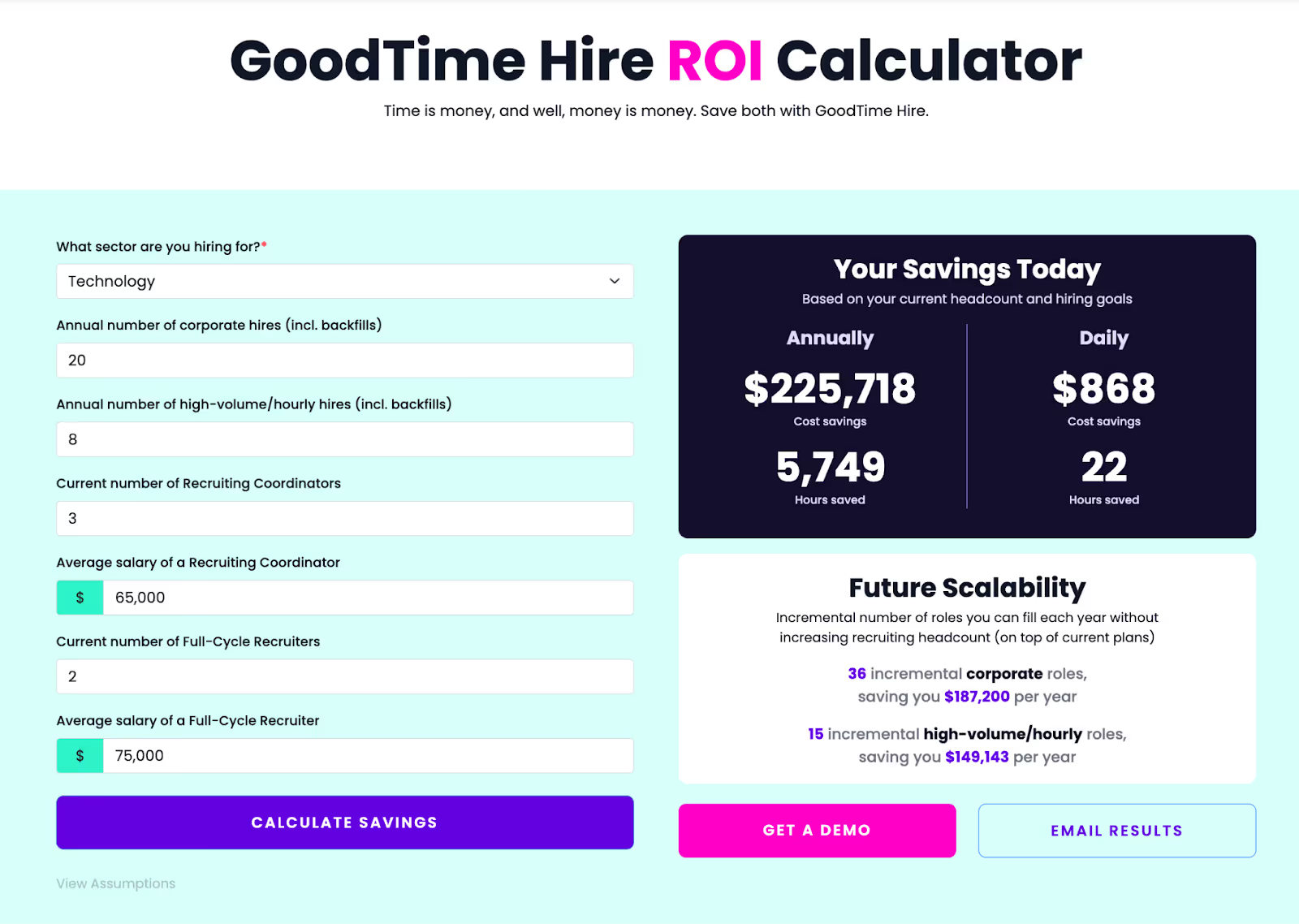
Why this calculator stands out:
- Contextual, tailored results: Users enter data like hiring volume and recruiter salaries to get projections that feel specific to their team.
- Tangible value metrics: Results are shown in hours and dollars saved, metrics that speak directly to ROI-focused buyers.
- Simple, usable interface: The form is clean and easy to use, making it accessible to users.
When to deliver: Launch alongside the product or shortly after, so it can help users make a buying decision.聽
Tips for creating an effective ROI calculator:
- Ask for data that your users will likely have on hand, like team size or average cost.
- Display results in a way that makes the value immediately obvious, e.g., graphs, side-by-side comparisons, or summaries.
- Highlight the 1鈥�2 outcomes that matter most to your buyer, like hours saved or cost reduced.
7 things not to miss when creating product launch content (a checklist)
Even with templates and timelines in place, it鈥檚 easy for important details to slip through when you鈥檙e building launch content. 贬别谤别鈥檚 a checklist to ensure you tick all the boxes when creating content:聽
鈥�Read: Product Launch Plan & Checklist - Launch Readiness Plan for PMMs
How to ensure launch content gets used
Creating launch content is only half the battle. The other half is making sure people actually use it. 贬别谤别鈥檚 how to make sure your content sticks:
Train teams on where (and how) to find content.
Don鈥檛 assume people will know where to look. During meetings, take time to walk through where key assets live, when to use them, and how to keep them up to date. Also, create cheat sheets, one-pagers, or even internal FAQs to make content discovery easier for the team.聽
Deliver content in context.
Emailing a PDF or dropping a deck into Google Drive isn鈥檛 enough. Reps need content at the point of use鈥攚hile they鈥檙e selling, supporting, or managing accounts. In-app delivery is key: embed content directly into CRMs, support tools, or even browsers so reps don鈥檛 have to dig to access what鈥檚 relevant.
Track usage and iterate.
Use tools that track which assets are being opened, shared, or ignored. This allows you to spot what鈥檚 landing and what鈥檚 not. If reps aren鈥檛 using a resource, it鈥檚 a signal: maybe it鈥檚 hard to find, too complex, or just not useful.聽
Ask them why they don鈥檛 use it, and then rectify the issue.
Empower managers to reinforce messaging.聽
Managers are key to making content stick. So, equip them with talking points, updated briefings, and usage data so they can reinforce messaging in standups, deal reviews, and one-on-ones.聽
馃挕How 黑料吃瓜网 helps PMMs create better launch content
黑料吃瓜网 makes it easy for PMMs to create, deliver, and improve sales content, all in one place. Here's how:
- Deliver content where reps work: 黑料吃瓜网 surfaces battlecards, talk tracks, and decks right inside Salesforce, Gmail, and Chrome, so reps always have what they need.
- Create assets with 黑料吃瓜网 AI: Use prompts to generate playbooks, tool definitions, and sales scripts in seconds.
- Summarize long docs: Turn dense messaging into skimmable, bite-sized content perfect for rep training and quick reference.
- Centralize your content: Manage and update all sales materials from a single source of truth.
- Track usage: See what鈥檚 getting used (and what鈥檚 not) so you can refine content based on real insights.
Want to nail your next product launch? Request a free demo.