

on . Visit the site for more guides and to get a copy of Melanie Fellay's book Just-in-Time: Enablement in a World of AI.
Why Copilot isn���t enough to solve enablement challenges
In this , speed is everything. The pace of innovation is accelerating faster than most organizations can absorb. Competitors launch new features every week. Buyer expectations shift daily. Reps are under immense pressure to keep up. Every minute a rep spends digging through portals, rewriting prompts, or copy-pasting files is a minute stolen from selling ��� or worse, a lost deal.
The companies that win will be the ones that embrace a more modern approach to enablement that empowers their reps to learn, adapt, and execute at lightning speed.
That���s why many IT leaders, under board-level pressure to figure out their company's AI strategy, are turning to horizontal AI copilots like Microsoft Copilot or Glean.
And it���s tempting to think that if your company invests in a horizontal AI solution, you���ve ���checked the box��� on enablement.
On paper, the value proposition is compelling:
- One assistant to rule them all. Connect Copilot or Glean to your enterprise systems, and suddenly you can search across SharePoint, Slack, Confluence, Salesforce, and more in one place.
- Natural language queries. Instead of digging through folders, users ask a plain-English question and get an instant response.
- DIY flexibility. With low-code/no-code agent frameworks, IT and SMEs can theoretically design custom automations and workflows by building their own prompts, integrations, and task automations.
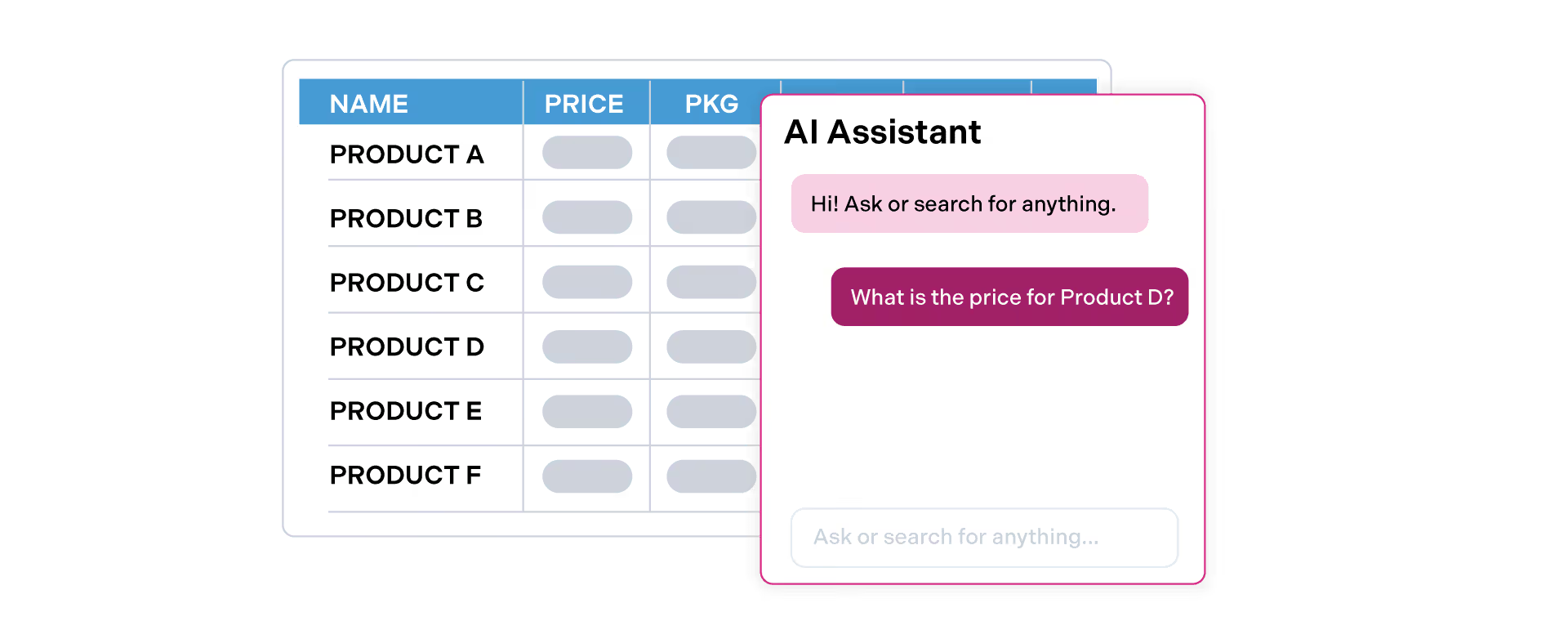
It���s a seductive vision: a single, all-knowing AI that replaces knowledge portals, surfaces answers instantly, and even executes tasks across the enterprise. For CIOs and CTOs tasked with ���getting an AI strategy in place,��� copilots feel like a quick win.
But the reality is far messier. of 650 IT leaders, even among the 82% of IT leaders piloting or deploying Copilot, over half flagged foundational issues like data quality and governance - challenges that usually stem from the DIY burden of building usable, reliable agents and ���query everything and anything��� nature of these copilots.
When IT and Enablement leaders try to stretch a general-purpose AI to cover sales enablement, they quickly run into spiraling costs, governance nightmares, and adoption failures - but most importantly, revenue leak.
In this blog, we���ll explore:
- The need for predictive, proactive workflows ��� why reps don���t just need search, they need automation that pushes guidance and next steps in the moment of need.
- The hidden costs of DIY agents ��� why building sales workflows on top of Copilot or Glean becomes a treadmill of maintenance, QA, and SME babysitting.
- Governance nightmares ��� why ���query everything��� copilots create data risks, amplify content decay, and fail to provide the guardrails sales orgs need.
- Reporting, prompting & observability ��� why horizontal AI tools can���t show what content actually drives revenue, leaving leaders flying blind.
- A side-by-side of general-purpose AI vs purpose-built AI for enablement ��� compare the benefits, capabilities, and costs of a solution like 窪蹋勛圖厙 vs Glean, Copilot, ChatGPT, or Gemini.
Enablement isn���t just about giving reps another way to find answers. It���s about helping them sell faster by predicting their needs, embedding structured workflows directly into the flow of work, and automating the actions that move deals forward.
The choice isn���t whether to adopt AI in enablement, it���s what kind of AI you adopt. General-purpose copilots promise breadth, but sales teams need depth: proactive workflows that anticipate rep needs, guardrails that prevent governance risks, and analytics that tie enablement directly to revenue.
And in the Change Economy, the companies that win will be the ones that move faster, with AI purpose-built for sales.
1. The need for predictive, proactive sales automation and agents
Let���s be clear: an ���ASK��� chat experience doesn���t solve enablement.
Tools like Glean and Copilot promise to unify knowledge by letting reps ���just ask��� for what they need. On the surface, it sounds logical: one search box, instant answers, problem solved.
But in practice, search-only approaches fall flat for sales. Why?
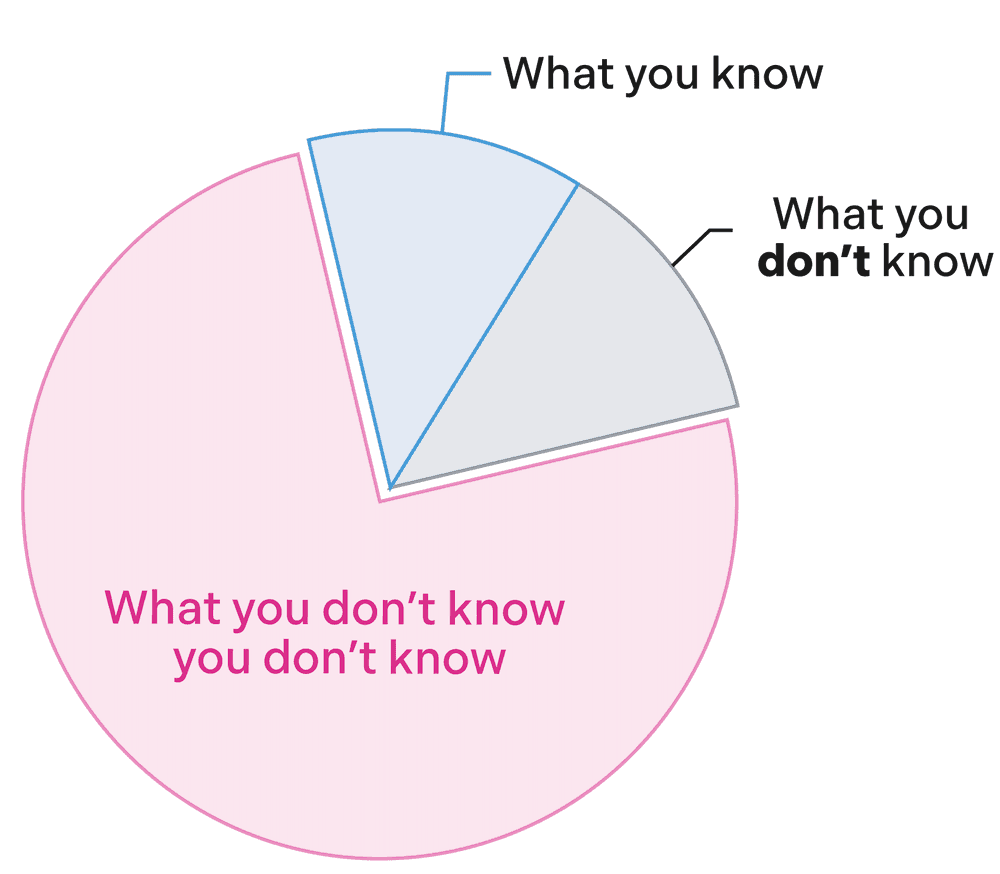
- Reps don���t know what they don���t know. The whole reason enablement exists is because reps have blind spots. If they don���t realize they need guidance on ���discounting policy��� or ���competitor objection handling,��� they���ll never go searching for it. Search helps when you already know you have a gap. Deals are won or lost in the moments when reps don���t.
- Even when they do know, most reps can���t prompt effectively. Crafting the ���perfect prompt��� takes context, precision, and training. Most salespeople don���t have the time or the AI skills to do this well. In fact, . If the quality of your enablement depends on reps being great at prompting, you���ve already lost.
- Copilots don���t understand sales context in real-time. General-purpose AI tools aren���t built with the sales rep use case in mind (ie, to anticipate deal stages, buyer personas, or revenue motions). At best, it can point back to a document but it doesn't have the context of the task you're doing or where you are.
This is why enablement can���t just be a better search experience. Sales enablement has never been about finding files ��� ��it���s about helping reps sell faster. That requires a different model: predictive guidance, proactive nudges, and built-in workflows embedded directly into the flow of work.
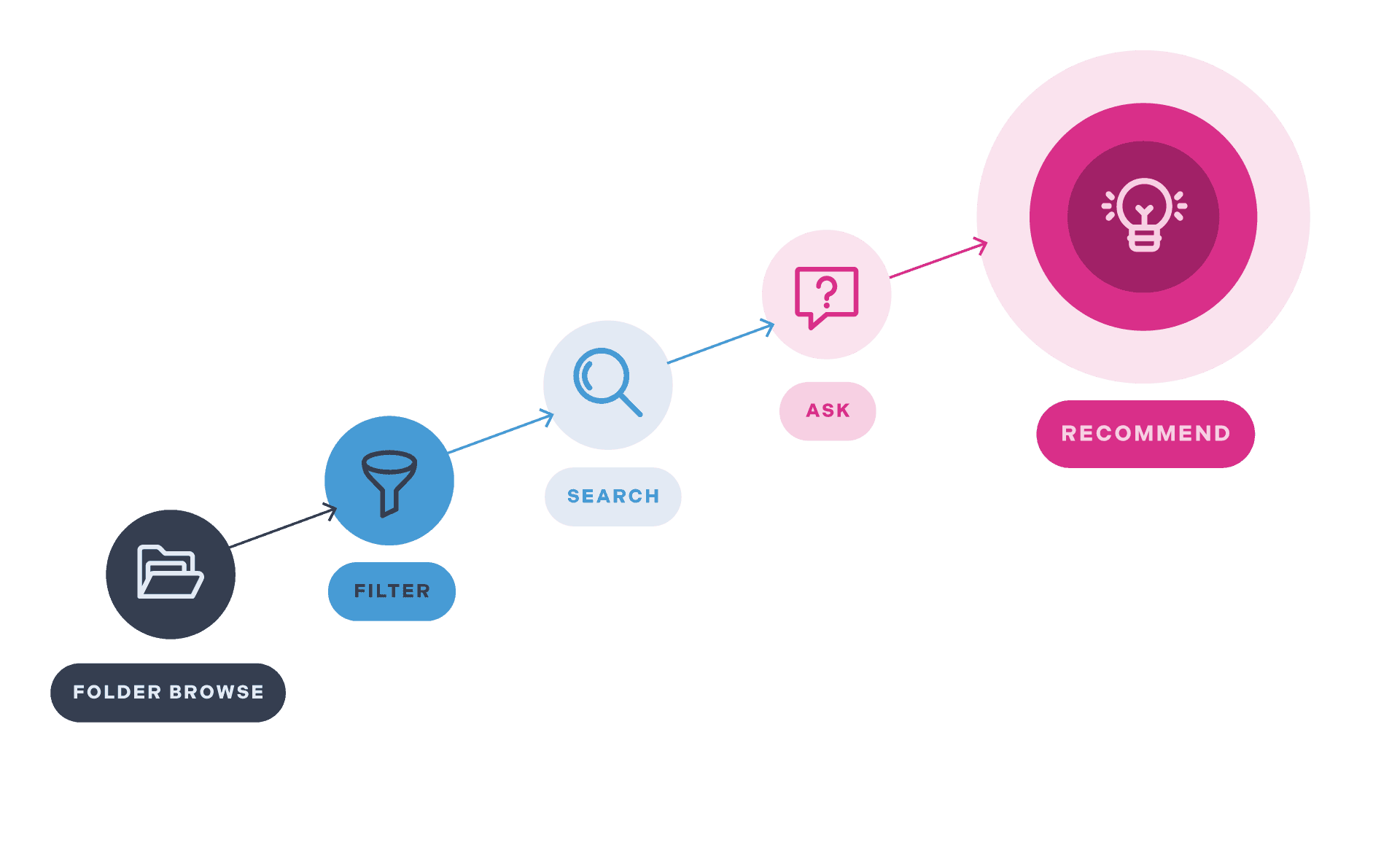
Sales enablement has never been about finding files ��� ��it���s about helping reps sell faster.
Why automated, integrated sales workflows (not links) drive adoption
General purpose AI chatbots like Glean, ChatGPT or Copilot typically answer by pointing back to a file. On paper, that feels helpful. In reality, it forces reps into a clunky, multi-step process: download the file, copy/paste snippets into an email, upload it into a Deal Room, or log into Salesforce to attach it manually. Each step adds friction, slows the deal down, and piles onto their already maxed-out cognitive load (see for the science behind how context-switching kills productivity).
But sales isn���t about finding files, it���s about creating buyer confidence, building trust, and moving deals forward. And that doesn���t happen when a rep is juggling four tabs just to complete one simple workflow.
What reps actually need is automation that pushes answers into their flow of work and bakes the next step right into the experience. Imagine this:
- After a key demo, you���re drafting a follow-up email. Instead of digging, the perfect case study for that prospect is already recommended to you, based on the call transcript and deal context.
- In the same click, you drop it into a Deal Room. If a Deal Room doesn���t exist, you create one instantly ��� pre-populated, personalized, and tailored to your buyer.
- Got a deck in Google Drive? Add it seamlessly without ever leaving the workflow.
And soon, much of this will be fully automated for you so you can focus entirely on selling while knowing your buyer is experiencing the best, most relevant content at every step.
That���s the difference between ���search��� and true sales process automation.
What predictive, proactive sales automation looks like
Enablement isn���t about search; it���s about action. The most effective AI doesn���t wait for reps to ask; it predicts what they���ll need, pushes guidance into their workflow, and gives them one-click actions to keep deals moving. Below are examples of the kinds of built-in workflows that transform enablement from reactive answers into proactive, revenue-driving automation.
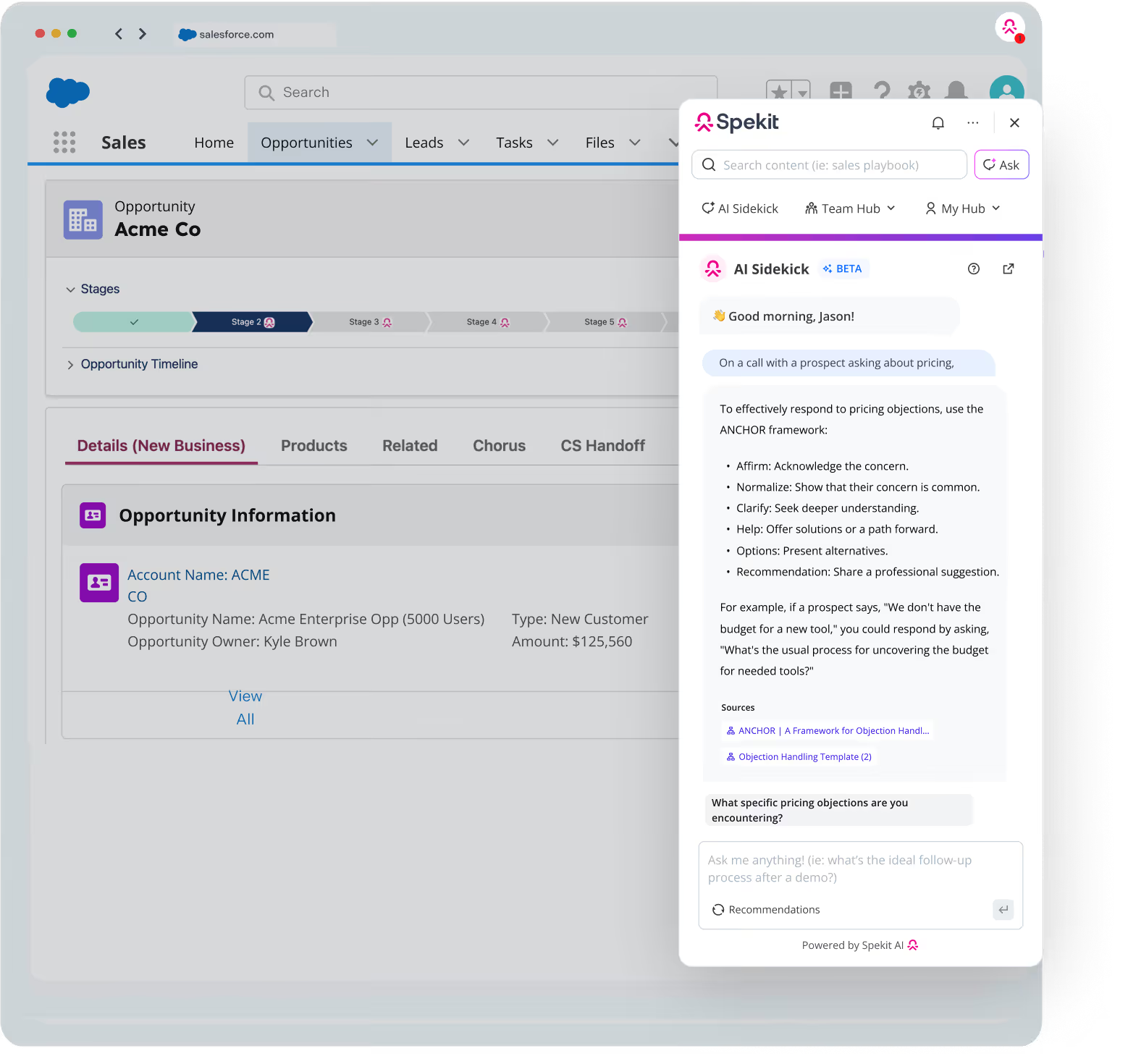
Proactive nudges
Reps win or lose deals in the moment. Proactive nudges ensure they never miss a buyer signal or the next best move, surfacing guidance before they even think to ask.
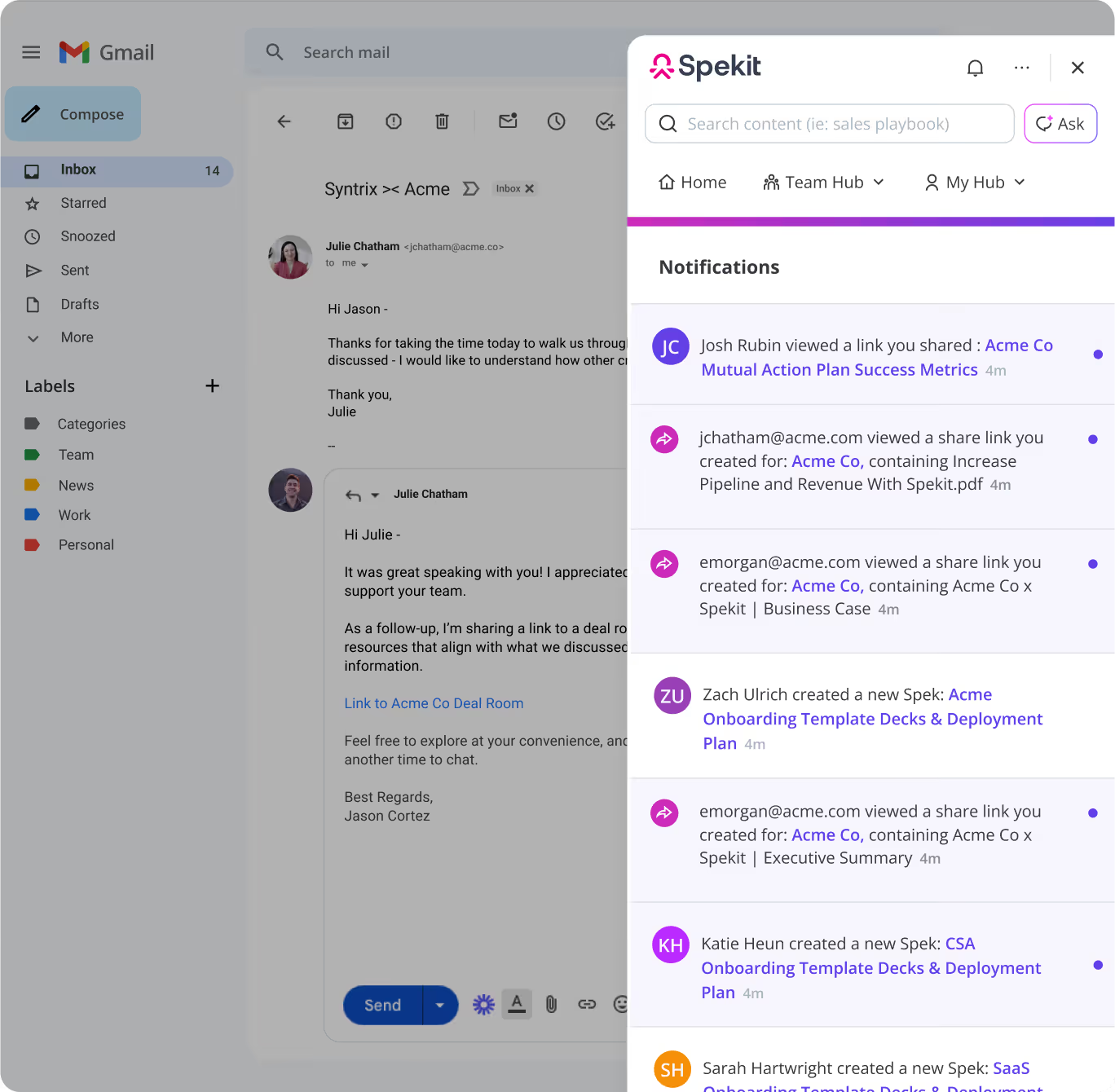
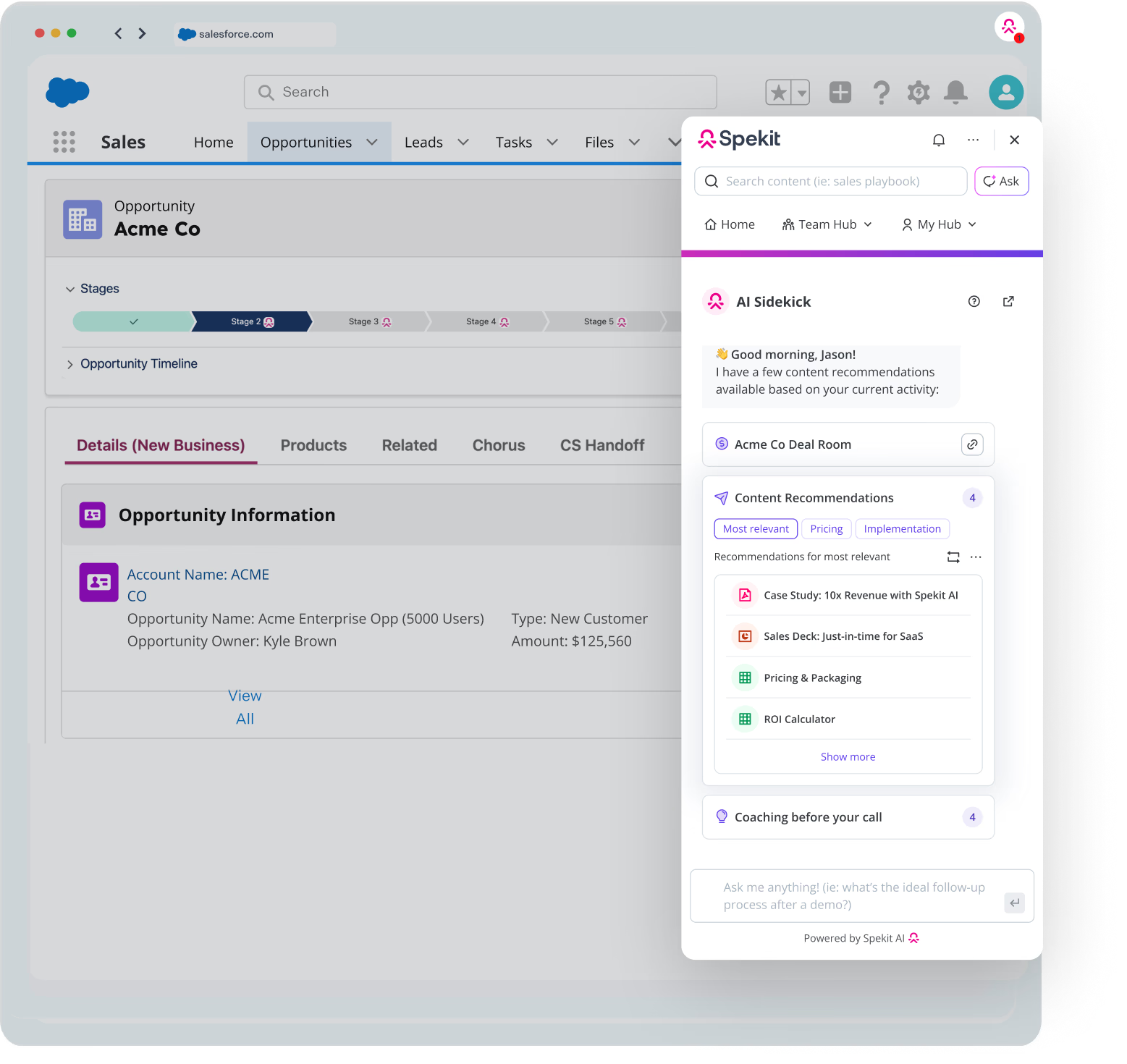
Predictive recommendations
Speed matters. Predictive recommendations anticipate rep needs before, during, and after buyer interactions so they always show up prepared and follow up flawlessly.

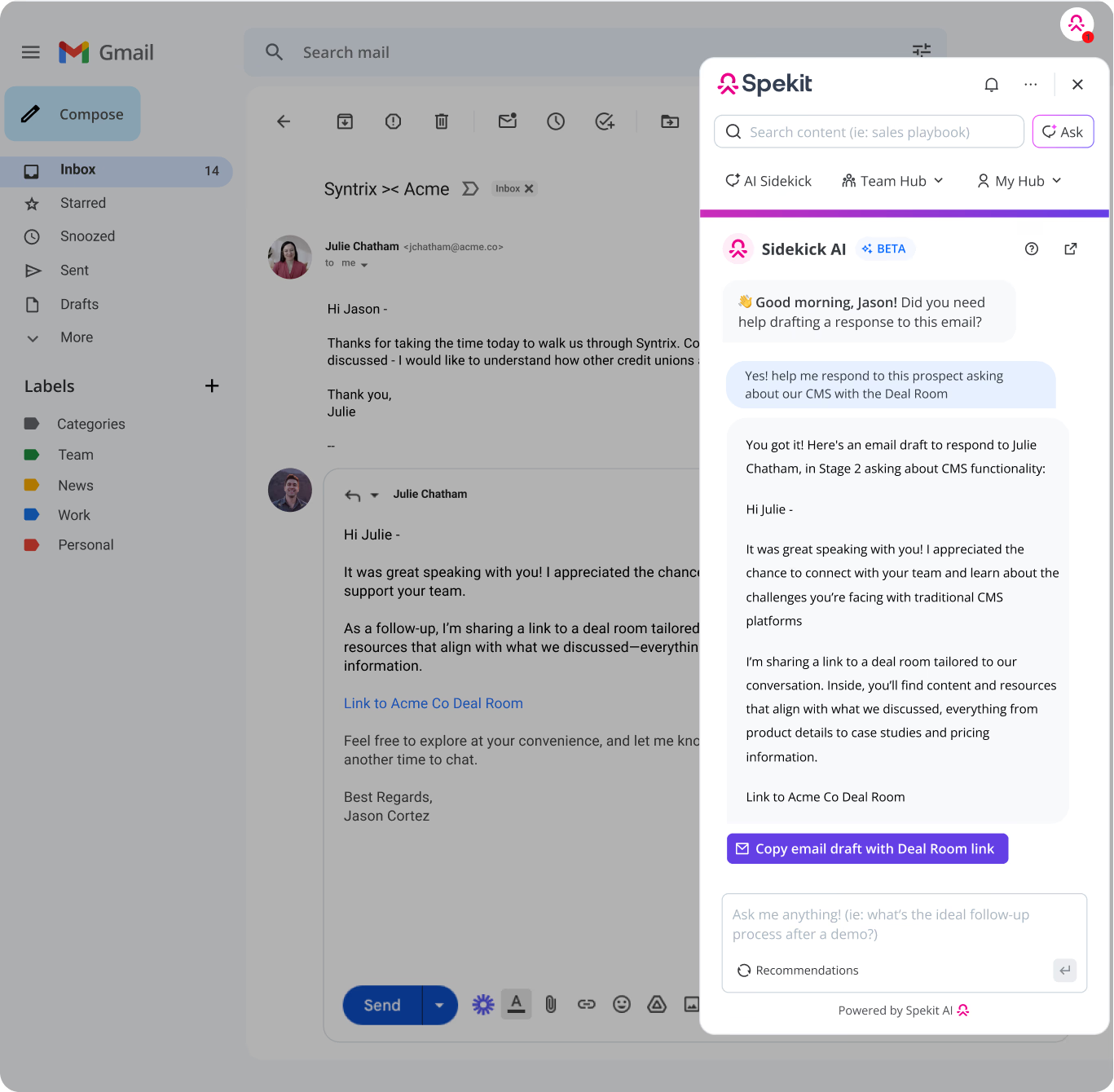
One-click actions & integrated automation
Reps don���t need links; they need action. One-click workflows eliminate friction, embed automation directly where they work, and keep deals moving without switching tabs.


No guessing. No prompting. No friction.
2. The hidden costs of DIY: Why you can���t ���just��� build an agent
���We can just build that.���
It���s a phrase every IT and enablement leader has heard or said themselves. After seeing the power of predictive, built-in workflows, it���s tempting for internal teams with good intentions to think: ���We���ll just build agents on top of Copilot or Glean for that.���
On the surface, it sounds clever. Why not design your own sales workflows with prompts and custom automations? But in practice, this approach almost always turns into a treadmill of cost, complexity, and constant maintenance.
Even the biggest companies in the world struggle with this reality. Take Google: despite billions in resources and world-class engineering talent, they recently retired their which was designed to compete with Airtable. Why? Because keeping up with user needs, integrations, and ongoing maintenance was too costly and unsustainable, even for Google. Priorities shift, orgs restructure, leaders change, and suddenly those beautiful custom-built workflows slip down the backlog until they collapse under neglect.
Think about how hard it already is to get what you need out of Salesforce. At least most CRM teams have deep Salesforce expertise, yet projects still take months. With agents, it���s worse. The skills are brand new, the playbooks don���t exist, and teams are learning as they go. What looks easy on day one quickly becomes a quagmire of rewrites, bug fixes, and broken promises.
If a tech giant like Google can���t justify the ongoing cost of maintaining a DIY workflow platform, how can internal IT and enablement teams expect to succeed in maintaining fragile, sales-specific agents on top of general-purpose copilots?
What building an Agent actually looks like:
Building effective agents isn���t about clever prompts. It���s about instrumentation, QA, and telemetry, all of which carry enormous hidden costs:
- Manual workflow design: Every motion (creating a Deal Room, surfacing competitor intel, following up with the right resources after a Gong call) has to be hard-coded. Nothing is pre-built for sales.
- Constant QA & maintenance: Every integration (ie, Salesforce field change), product launch, or pricing update risks breaking agents. Each fix requires testing across scenarios to ensure accuracy.
- Instrumentation overhead: To make agents reliable, IT has to wire in edge-case handling, map dependencies across tools, and continuously refine prompts. Without this, reps get hallucinations or contradictory answers.
- Telemetry burden: Most of the platforms have minimal, if any, built-in reporting on usage. That means IT has to build custom logging pipelines, dashboards, and reporting layers to answer basic questions (which just won���t happen).
- Did the rep use the recommendation?
- Was it correct?
- Did it help move the pipeline forward?
- SME drain: Product managers, sales coaches, and enablement leaders inevitably get pulled in for QA and corrective work, burning cycles fixing bad answers instead of coaching or selling.
The result? A system that looks cheap on paper but drains resources in practice.
- 2���3 IT FTEs per year are tied up just maintaining fragile prompts, workflows, and telemetry across Salesforce, Outreach, Gong, Gmail, and more.
- Delays - everything is harder and takes longer than you���d expect it to.
- Dozens of SMEs are distracted from higher-value work to debug, validate, and re-author workflows.
- Revenue leakage when reps act on outdated answers, share the wrong deck, or miss a competitive angle.
Instead of innovating around real business challenges, your IT and enablement teams end up babysitting brittle, homegrown agents, spending all their time on QA rather than building true outcome-driving innovation.
Questions to challenge the ���we can just build this��� mentality
Manual Workflow Design
- Who on our team is going to hard-code every sales motion (Deal Rooms, Gong follow-ups, competitor battlecards) into prompts or agents?
- How long will it take to scope, design, and QA each one?
- What happens when our sales process changes���who updates all those workflows?
Constant QA & Maintenance
- When Salesforce fields, product data, or pricing models change, who is responsible for fixing the broken agents?
- How quickly can IT guarantee those fixes before reps send buyers outdated or incorrect information?
- Do we have the resources to regression test every workflow each time something changes?
Instrumentation Overhead
- How will IT handle edge cases (e.g., multiple buyers, conflicting inputs, half-completed data)?
- What���s the plan for mapping dependencies across Salesforce, Gong, Outreach, Gmail, etc.?
- Who owns prompt refinement when hallucinations or contradictory answers creep in?
Telemetry Burden
- Where will we track whether reps are actually using these agents?
- How will we measure if the recommendation was correct, useful, and moved pipeline forward?
- Who is going to build and maintain the dashboards, pipelines, and reporting layers required to provide that visibility?
SME Drain
- How much time will product managers, sales coaches, and enablement leaders lose to QA and corrective work?
- Who is accountable when reps rely on bad answers and deals stall or are lost?
- What���s the opportunity cost of SMEs babysitting agents instead of building training, content, or strategy?
Resourcing & ROI
- How many IT FTEs will be permanently tied up just maintaining fragile agents and workflows? (Industry average: 2���3 FTEs per year.)
- What happens when IT priorities shift? Who picks up the maintenance backlog?
- What���s the total cost of ownership compared to a pre-built solution with governance, telemetry, and workflows already included?
3. Lack of reporting, prompting & observability
Even if you put aside the massive cost of building and maintaining DIY agents (though you shouldn���t), there���s another fundamental flaw with Copilot, Glean, and other general-purpose AI tools: they provide zero visibility into what���s actually working in your GTM.
These tools can surface answers, but they can���t tell you whether those answers were accurate, impactful, or revenue-driving. Why? Because Copilot and Glean don���t actually deliver enablement, they simply redirect you to it. Ask a question, and you���re usually sent to the original source: a SharePoint doc, a Confluence page, or a PDF buried in your CMS.
The second a rep clicks out, tracking stops cold.
- Did the rep actually use the battlecard?
- Did they share it with the buyer?
- Did it move the deal forward, or was it ignored?
With Copilot and Glean, you���ll never know. They act as a front door to scattered systems, but because the experience fractures the moment a rep leaves to view the source, all observability is lost.
The problem is structural: these platforms were built to retrieve, not measure. And without measurement, leaders are flying blind.
Why this matters now: Insights will divide winners and losers
In the Change Economy, speed isn���t just about how fast you deliver answers; it���s about how fast you can learn what works and act on it. In Chapter 9 of , I argue that speed to insights is the differentiator.
But the problem is that most organizations are operating in the dark. This isn���t just inconvenient���it���s the default state of most sales orgs today. When I ask sales leaders questions like:
- ���What knowledge, when mastered, has the biggest impact on ramp time?���
- ���Where do reps most need coaching?���
- ���How are your best reps preparing differently for their calls?���
- ���What knowledge gaps are costing us opportunities?���
Most admit they simply don���t know. Instead of visibility into what drives success, they rely on retroactive analysis after missed quotas or lagging win rates.
Even when fragments of this data exist, they���re scattered across disconnected systems. The result is insight chaos: incomplete, delayed, and irrelevant by the time leadership finally sees it.
Just-In-Time Enablement: The key to measurable impact
This is where purpose-built, vertical AI solutions for sales like 窪蹋勛圖厙 change the game. Unlike Copilot or Glean, which stop tracking the moment a rep clicks into a file, Just-In-Time Enablement is embedded inside the workflow itself.
Because 窪蹋勛圖厙 works everywhere the rep works (Salesforce, Gmail, Slack, Gong, and more), it captures not just what content was accessed, but when and in what context. Did the rep pull up a pricing guide in the middle of a negotiation? Did they open a competitor battlecard right before a CFO call? That context is gold. Without it, you���ll never tie enablement back to real outcomes.
As I argue in Just-in-Time: The Future of Enablement in a World of AI, context is what transforms enablement from a content library into a performance engine. By anchoring knowledge to the moment of need, you unlock insights that were previously invisible.
Instead of fragmented, delayed signals, Just-In-Time Enablement delivers:
- Centralized analytics: one source of truth for how enablement is used across every workflow.
- Context-rich visibility: see not just that content was used, but when, where, and why.
- A true feedback loop: measure what works, double down on it, and fix what doesn���t.
This holistic view empowers revenue leaders to answer the questions Copilot and Glean never will. And most importantly, it closes the loop between enablement and revenue.
How to challenge the thinking: Questions to Ask
When your IT team says, ���Copilot or Glean can handle enablement,��� here are the questions that cut through the hype:
Tracking Usage & Impact
- When Copilot links me to a file, how do we know if the rep actually consumed it?
- Can we see if it was shared with a buyer or influenced pipeline progression?
- Where in the system can I view usage tied directly to revenue outcomes?
Context & Observability
- How do we capture what the rep was doing at the moment they asked a question���were they in Salesforce, writing an email, or on a Gong call?
- Can we compare how top performers vs. struggling reps use enablement content in real time?
Program Effectiveness
- How do we identify which enablement programs or training modules actually shorten ramp time?
- If a CRO wanted a report on which knowledge is most correlated with quota attainment, how quickly could we produce it?
Single Source of Truth
- Where is the central system of record that ties enablement engagement to pipeline velocity and revenue impact?
- If reps access content across multiple systems, how is that usage unified into one analytics view?
4. Governance nightmares: The risk of ���query everything���
Products, services, competitors, and buyer expectations are evolving faster than ever. New features launch weekly, pricing shifts constantly, and competitive positioning changes overnight. This creates a massive change management challenge for sales organizations.
Reps need the latest content, messaging, and process guidance at their fingertips���but only if it���s accurate and approved. Without the right mechanisms to manage change, the ���garbage in, garbage out��� problem is inevitable:
- Garbage in: Outdated decks, conflicting playbooks, duplicate battlecards, or last year���s pricing sheets that never got retired.
- Garbage out: Copilots and horizontal AI tools surfacing those bad answers confidently to reps (and sometimes buyers).
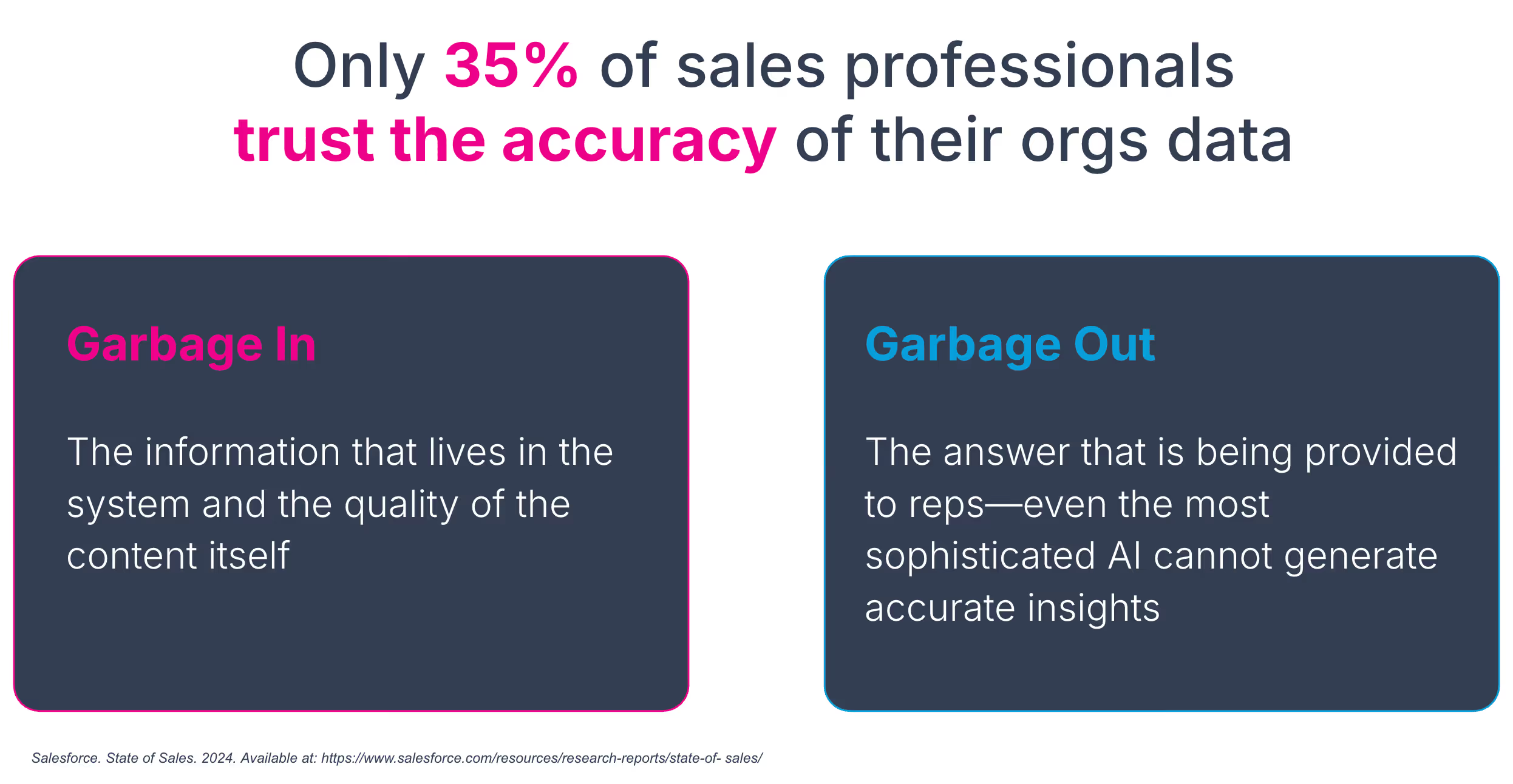
The faster the business changes, the faster this garbage piles up. But here���s the catch: without visibility, you can���t fix content quality. Insights and governance are two sides of the same coin.
Without reporting, there���s no quality control. Without quality control, there���s no improvement.
- No observability ��� no quality control. Without usage data, you can���t tell what content is working and what���s misleading deals.
- No governance ��� content decay. Outdated or risky files pile up and copilots surface them as if they���re accurate.
- No feedback loop ��� no improvement. Without both, you���re flying blind.
And this pace of change makes governance non-negotiable.
Why horizontal AI solutions are running into governance challenges
1. They don���t host or manage content.
Copilots scan across SharePoint, Slack, Confluence, Teams, and more, but they don���t actually manage content quality. They simply point reps back to whatever source file exists in that system, whether it���s accurate or not. The underlying sprawl remains untouched, and the decay continues to multiply.
Horror story: In a small exec forum, a Fortune 500 company shared that an employee asked Copilot about org changes. Because it indiscriminately scanned SharePoint, it surfaced a confidential layoff list directly to the employee on that list. Ouch.
2. They lack integrated change management.
Each repository the Copilot is pulling from still has its own versioning, permissions, and decay. Copilots don���t unify them, nor do they push proactive updates. There���s no way to cascade a pricing change across every asset or notify reps in their workflow when something critical has shifted. At best, copilots help reps find the haystack. They don���t ensure the haystack is golden.
Breaking this cycle requires a platform that enforces governance and delivers reporting tied to revenue outcomes something horizontal copilots simply can���t do.
Why vertical, purpose-built enablement solutions are essential to prevent garbage out
This is where vertical AI enablement platforms stand apart. A true sales-focused solution isn���t just a smarter search bar; it���s a governance and content engine built for the reality of constant change.
Drawing from the future of enablement depends on solving content decay ��� the silent killer of productivity and trust. Outdated, conflicting, or duplicated information undermines deals, frustrates reps, and erodes buyer confidence. In fact, as of January 2025, over half of marketing and enablement teams believe that 40���60% of their content needs a refresh according to this research report where over 300+ teams were surveyed.
A vertical enablement AI platform solves this by unifying governance, analytics, change management, and content creation into a single loop:
- Centralized governance: Only approved enablement content is surfaced to reps, no rogue HR docs or outdated finance PDFs leak into workflows.
- Integrated change enablement: Updates cascade automatically from systems of record (Salesforce, Jira, product docs), with in-app notifications alerting reps in real time.
- Analytics tied to outcomes: Every click, share, and recommendation is measured and tied to pipeline and revenue impact, creating a closed loop between enablement and business outcomes.
- Dynamic content curation: AI can flag outdated or conflicting content, detect when competitor mentions spike on calls, and even draft updated battlecards or product messaging in real time.
In other words, horizontal copilots amplify chaos; vertical enablement AI prevents it. Instead of drowning in content decay, reps get guidance that is always accurate, contextual, and revenue-driving.
How to challenge the need for centralized content management
Governance & Security
- How do we prevent copilots from surfacing sensitive HR or finance data to sales reps?
- What central system governs which content is sales-approved vs. off-limits?
- Who owns quality control across SharePoint, Confluence, Slack, and Drive?
Content Accuracy & Freshness
- How do we prevent outdated pricing or product info from being served up?
- If Salesforce fields change, how do updates cascade into related enablement instantly?
- If two conflicting battlecards exist, how do we ensure reps see the right one?
4. Why IT should care: the case for a vertical AI enablement solution
Horizontal copilots like Copilot or Glean promise breadth, but when it comes to enablement, breadth without depth creates risk. Building DIY agents on top of these platforms drains IT resources, introduces governance gaps, and leaves sales teams stuck with reactive search instead of actionable workflows.
Why pre-built sales workflows beat DIY Agents
A vertical, purpose-built enablement solution flips that equation. Instead of endless IT firefighting, a platform like 窪蹋勛圖厙 ships with guardrails, governance, and pre-built sales workflows designed to anticipate rep needs and tie every action back to revenue with:
- Pre-built, domain-specific workflows ready on day one.
- Automatic updates that cascade everywhere content is used.
- Reporting and analytics that tie enablement activity directly to revenue.
In short, purpose-built enablement platforms don���t compete with IT priorities; they protect them.
- Risk Mitigation ��� Only vetted, sales-approved content is surfaced, avoiding governance disasters like HR docs or outdated pricing sheets leaking into AI responses.
- Cost Containment ��� No armies of IT remapping Salesforce fields or rewriting broken prompts every time a product launches or pricing changes.
- Strategic Focus ��� IT can concentrate on higher-value initiatives, while 窪蹋勛圖厙 handles the sales-specific workflows that actually drive pipeline.
That means lower total cost of ownership, higher ROI, and no hidden IT overhead.
AI Sidekick: 窪蹋勛圖厙���s next-level differentiator
窪蹋勛圖厙 adds a unique angle with AI Sidekick an embedded, just-in-time sales assistant and coach. Unlike Copilot or Glean, which rely on reps to ask the right question, Sidekick is predictive and contextual:
- Predictive Layer ��� Surfaces the right battlecard when a competitor is mentioned, recommends the right case study at procurement, or pushes ROI messaging for a CFO persona.
- Contextual Layer ��� Embedded directly in Salesforce, Gmail/Outlook, Gong/Chorus, LinkedIn Sales Navigator, and more. It doesn���t break rep flow, it becomes a habit.
- Built-In Workflows ��� Meeting prep, call follow-ups, Deal Room creation, objection handling, and onboarding are all automated, no IT prompt engineering required.
- Governed & Observable ��� Scoped access ensures only approved content is surfaced. Automatic updates cascade from Salesforce, Jira, or product docs. Every click, share, and recommendation is tracked back to pipeline impact.

Quick comparison: Copilot/Glean vs. 窪蹋勛圖厙
At the highest level, the difference is simple: this is the leap from ���AI that answers��� ��� to ���AI that drives revenue.���
- Copilot/Glean = reactive, generic, tab-switching search.
- 窪蹋勛圖厙 Sidekick = predictive, contextual, workflow-embedded enablement with built-in governance and revenue accountability.
But here I���ve included a detailed breakdown for reference.
Closing thought
If you���re evaluating 窪蹋勛圖厙 vs Copilot or 窪蹋勛圖厙 vs Glean, the decision comes down to what matters most. Horizontal AI copilots are powerful for broad enterprise search, but they weren���t built for enablement.
窪蹋勛圖厙 eliminates hidden IT costs, provides revenue-tied observability, and puts guardrails in place to prevent governance nightmares. With AI Sidekick, it goes even further, moving beyond ���search and ask��� to proactive, contextual, just-in-time assistance that reps can trust and IT can govern.
That���s why even if your IT team invests in Copilot or Glean, you still need 窪蹋勛圖厙. Because while copilots help you find answers, 窪蹋勛圖厙 Sidekick helps your reps sell smarter, faster, and safer.
���